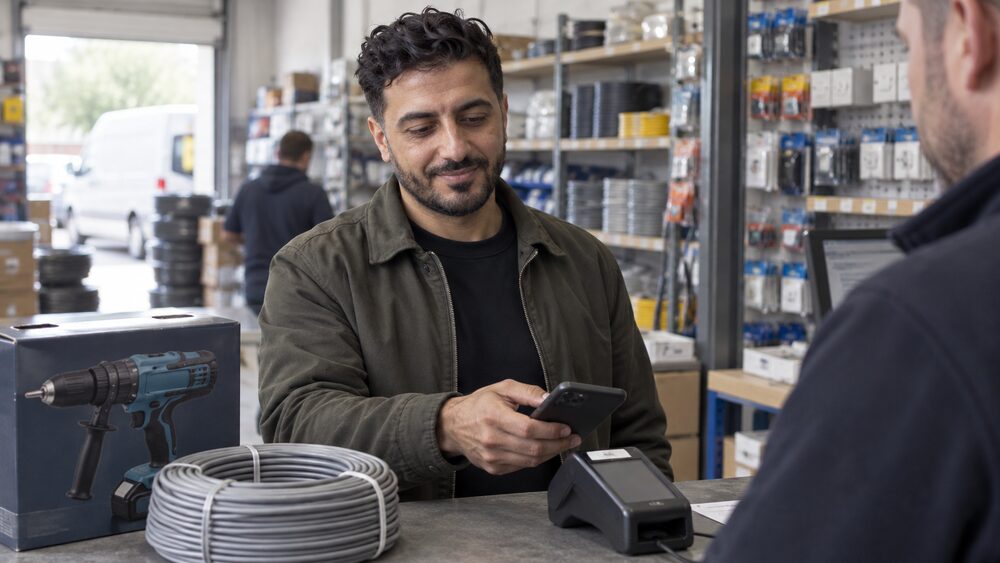
A digital wallet and a contactless debit card do the same job in a shop: you hold something near the reader and the payment goes through. The difference is what you are holding and what the shop sees. A contactless card is capped at £100 per tap in the UK, above which you enter your PIN. A phone wallet such as Apple Pay, Google Pay or Samsung Pay can usually go above that £100 limit, where the retailer allows it1.
That single difference drives most of the practical questions. If you regularly spend more than £100 in one go, a wallet saves you reaching for your card and PIN. If you mostly buy small items, the two are near-identical in use, and the choice comes down to how you feel about carrying a phone rather than a card, and what happens if one of them is lost.
Both are contactless payments at heart. Contactless is available on debit, credit, charge and pre-paid cards, and the same tap-and-go technology sits behind the wallet on your phone3. What changes is the layer of security wrapped around it, and the rules your bank applies when something goes wrong.
How a digital wallet differs from paying with your contactless card
Apple Pay is a digital wallet that lets you pay for goods by moving your iPhone over a contactless reader, removing the need to hand over a card1. Google Pay and Samsung Pay work the same way on their own devices. The card itself stays in your pocket, or at home.
The practical difference is the extra security layer. Digital wallets add measures that contactless cards do not have, such as biometric authentication or unlocking a phone with a pass code5. On an iPhone, passcodes and fingerprint recognition (Touch ID) or facial recognition (Face ID) add another layer, and on Apple Watch wrist detection must be enabled1. A contactless card, by contrast, needs no authentication at all below the £100 limit.
The second difference is the ceiling. Contactless transactions made using a card stored in a digital wallet have no limit in theory, because the wallet authenticates you before the payment2. In practice, some merchants apply the contactless limit and will only accept wallet payments of up to £1006. Others set their own limits at the terminal7.
The third difference is what the shop receives. With a card, the terminal reads your card number. With a wallet, it receives a token instead, which is why a wallet payment online does not hand your card details to the retailer8.
Which phones work: Apple Pay, Google Pay and Samsung Pay
Anyone with a compatible Apple device can use Apple Pay1. Google Pay works on Android devices running Android 9.0 or above, according to Google's own guidance, though other Google pages describe different minimum versions, so the exact requirement depends on which page you read9. Samsung Pay runs on Galaxy smartphones and is available on select devices10.
Setting each one up takes a few minutes:
- Apple Pay on iPhone: open the pre-installed Wallet app and add the cards you want to use, using the camera to capture the details quickly1.
- Apple Pay on iPad: go to Wallet & Apple Pay under Settings and tap Add Credit or Debit Card9.
- Google Pay: download the app from the Play Store, click + Payment method, and add your card by photo or by typing the details9.
- Samsung Pay: open the Samsung Pay app, click Add, then Add credit or debit card9.
Nearly all banks, building societies, credit card companies and prepaid card providers in the UK support both Apple Pay and Google Wallet1. There are exceptions worth knowing. The Amazon Barclaycard does not support Apple Pay, though Google Pay works on Android devices11. Where a bank offers several accounts, support is usually consistent across them: Ulster Bank says Apple Pay and Google Pay can be used for contactless payments even when the amount is over £100, subject to retailer limits7.
Spending limits: the £100 contactless cap and when a wallet can go over it
The contactless card limit has moved twice in recent years. It rose from £30 to £45 on 1 April 202012, and the Treasury confirmed it would rise again to £100 in the Budget of 3 March 202113. The £100 limit took effect from 15 October 20215. Today, most contactless purchases can be made up to a £100 limit, and anything above that needs your PIN14.
Wallet payments sit outside that cap. Apple Pay and Google Wallet users have always been able to exceed the £100 limit where the retailer allows it1. Banks describe it in their own terms: Barclays says there is no £100 limit on contactless transactions made with an Apple device15, HSBC tells customers they can say goodbye to the £100 contactless limit with Apple Pay16, and Bank of Ireland UK says there is no upper limit, though transactions over £100 may not be supported by some merchant terminals17.
The retailer is the deciding factor, not the bank. Some merchants apply the contactless limit and will only accept payments of up to £1006. Contactless payment limits may apply depending on the retailer and the payment terminal used18. If a terminal will not take a wallet payment above £100, the payment will default to Chip and PIN for a card, or to another method for a phone5.
One further rule catches people out. If you set your contactless limit below £100 in your banking app, that lower limit also applies to contactless Apple Pay or Google Pay transactions19.
Tokenisation means the shop never sees your card number
When you add a card to Apple Pay, Apple replaces your card's details with something called a device account number, also known as a token, which means the real information is never shared during purchases1. The same principle applies across the wallets: card information is replaced with a device account number or token, and the details are encrypted and stored on your device rather than on external servers2.
This matters most online. Using a digital wallet such as Apple Pay, Google Pay, PayPal or Samsung Pay ensures your card details stay private8. A retailer that accepts wallet payments receives a token that is useless if its systems are later breached, because the token is tied to your device and not to your account number.
The idea has spread to physical cards. Apple's numberless credit card was the first mainstream product on the market when it launched in the US in March 2019, and other providers have since removed numbers from cards altogether, storing payment details in the banking app instead20. The direction of travel is the same: fewer places where a full card number is visible.
Tokenisation does not remove every risk. It protects the card number, not the transaction. If someone has your unlocked phone, they can use the wallet. That is why the phone's own lock, whether a passcode, fingerprint or face scan, is the real security boundary1.
Where you can pay: shops, apps, websites and TfL
Both Apple Pay and Google Pay work at any shop that accepts contactless payments, including major retailers such as Boots, M&S, the Post Office, Starbucks and Waitrose, and on the Transport for London network1. All retailers who accept contactless payments will accept Apple Pay, whether they are in the UK or overseas21.
The wallet also works in places a card cannot easily go. You can use Apple Pay in store, in apps, on websites and on Transport for London22. Bank of Ireland UK puts it plainly: you can use Apple Pay wherever you see the Apple Pay logo or the contactless payment symbol, in shops, in apps and on the web in Safari17. Monese describes acceptance as anywhere that takes contactless payments, including shops, transport, hotels, restaurants and other vendors worldwide23.
On the Tube, Apple Pay works differently from a card in one useful way. You can touch in and out without using Face ID, Touch ID or the side button on your Apple Watch, using a feature called Express Travel24. You set it up by tapping Express Travel Card and choosing your card22.
Not every retailer takes every wallet above the limit. Tesco, for example, has historically capped wallet spending at £30 in some stores, though it has trialled higher-value contactless with Apple Pay2. Retailer acceptance changes over time, so the terminal, not the brand, is the reliable guide.
If your phone or card is lost or stolen
If your card is lost or stolen you may be protected against fraudulent activity and will not be liable for any losses, unless you gave your card to someone4. That protection applies to contactless payments generally, which offer the same level of fraud protection as standard Chip and Pin transactions4.
For a lost phone, the wallet can be switched off remotely. If you lost your phone or it was stolen, you could stop payments by logging into Apple's iCloud or by putting your device into lost mode through the Find My Phone app1. Santander's terms set out the same idea for each wallet: cancel your digital cards using Find My iPhone for Apple Pay, Android Device Manager for Google Pay, or Samsung's Find My Mobile for Samsung Pay25.
Freezing a card is a separate question, and the answer is not always what people expect. A freeze will block most payments but not all, because some offline contactless transactions can still go through26. Halifax sets out the detail: a contactless freeze blocks contactless payments with your debit or credit card, including debit card contactless payments through Apple Pay and Google Pay, but does not block credit card contactless payments through those wallets27.
If a payment goes through that you did not authorise, the route is your bank first, then the Financial Ombudsman Service if you are not satisfied with the response. The ombudsman is free to use.
What happens to phone payments if you block your debit card
Blocking a debit card and blocking a wallet are two different actions, and banks treat them differently. Halifax's contactless freeze blocks contactless payments with your debit or credit card, including debit card contactless payments through Apple Pay and Google Pay, but it does not block credit card contactless payments through those wallets27. So a freeze on one card may leave a wallet linked to a different card working.
The general rule is that a freeze blocks most payments but not all, because some offline contactless transactions can still go through26. If you want to stop wallet payments entirely, the reliable step is to remove the card from the wallet or use the device's own lost mode, not just to freeze the card1.
If a payment is declined, the reason is usually the terminal or the limit rather than the wallet. Contactless payments have a limit of £100, and above that the payment defaults to Chip and PIN for a card, or to another method for a phone5.
The rules that protect you, and where they stop
The core protection is the same for both methods. Contactless payments offer the same level of fraud protection as standard Chip and Pin transactions4. If your card is lost or stolen you may be protected against fraudulent activity and will not be liable for any losses, unless you gave your card to someone4.
Tokenisation adds a layer that a physical card does not have. Because the shop receives a device account number rather than your card number, a breach at the retailer does not expose your card details1. That is a real difference in the online case, where a card number typed into a checkout can be stored by the retailer.
Where the protection stops is at the phone itself. A wallet is only as secure as the lock on the device. If someone has your unlocked phone, or your passcode, they can pay. The authentication step, whether a face scan, fingerprint, PIN or password, is what stands between a lost phone and a payment1.
There is also a limit to what a freeze does. A freeze blocks most payments but not all, and some offline contactless transactions can still go through26. If you are worried about a lost device, removing the card from the wallet or using the device's lost mode is the step that actually stops payments1.
For free, impartial help with a payment problem, MoneyHelper and the Financial Ombudsman Service both offer it. Your bank is the first point of contact for an unauthorised payment.
Sources28 cited
- What is Apple Pay? Which?, 2026-03-05
- How much is the limit on Apple Pay at Tesco and high street retailers? Which?, 2018-12-14
- Payment methods Building Societies Association, 2023-01-10
- Safer ways to pay Consumer Council, 2026
- Contactless limit change FAQs UK Finance, 2021-10-15
- Apple Pay Monzo, 2026-09-26
- Ways to pay Ulster Bank, 2026-09-25
- How to spot an online shopping scam Which?, 2026-08-03
- Apple Pay Lloyds Bank, 2026-09-27
- Pay in store Visa, 2026
- Apple Pay FAQs AIB (NI), 2026
- Coronavirus: what it means for mortgages, savings, borrowing and benefits Which?, 2020-04-01
- Budget 2021: what you need to know Which?, 2021-03-03
- How to make it easy to pay on the go Danske Bank, 2026-09-25
- Apple Pay Barclays, 2026
- Apple Pay HSBC UK, 2026
- Apple Pay Bank of Ireland UK, 2026-09-25
- Apple Pay Barclays, 2026
- Apple Pay help Clearpay, 2026-09-26
- What are numberless cards and could they help stop fraud? Which?, 2022-07-26
- Contactless payments AIB (NI), 2026
- How to set up Apple Pay Royal Bank of Scotland, 2026-09-25
- Apple Pay Monese, 2026
- Fitbit Pay terms and conditions Santander, 2026-09-25
- The fault in our cards: how freezing your debit card won't block all payments Which?, 2019-10-10
- Card freezes Halifax, 2026-09-27
- Google Pay Barclaycard, 2026
- Why replacing your bank card might not stop scammers Which?, 2026-07-03


 MoneyHelperFree, impartial money and pensions guidance, set up by government
 FSCSProtects your money if a bank, insurer or investment firm fails
 Financial Ombudsman ServiceFree, independent help when a complaint about a firm is not put right
 Citizens AdviceFree advice on money, consumer and legal problems in England and Wales